
Have you ever found yourself frustrated by clunky word processors, losing your formatting the moment you copy and paste text into a website or email? If so, it’s time to meet your new best friend: Markdown.
Whether you are a developer, a blogger, a technical writer, or just someone who takes a lot of digital notes, Markdown is the secret weapon you didn't know you needed.
What Exactly is Markdown?
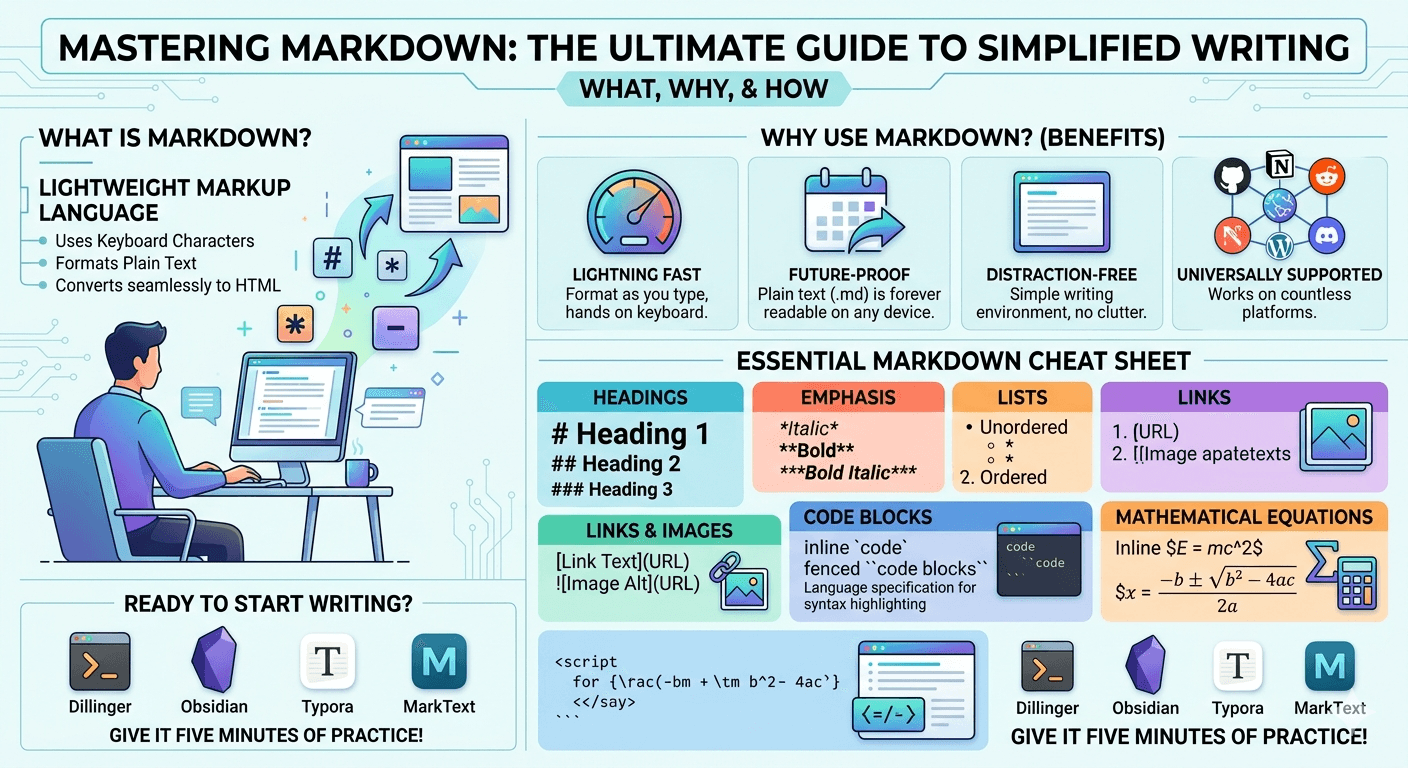
Created in 2004 by John Gruber, Markdown is a lightweight markup language. That sounds technical, but it simply means adding standard keyboard characters (like asterisks, hashtags, and dashes) to your plain text to format it.
Instead of clicking buttons for bolding, italics, or headers, you type a few specific symbols. The Markdown application then seamlessly translates your text into clean, beautifully formatted HTML behind the scenes.
Why You Should Switch to Markdown
You might be wondering why you should learn a new way to write when traditional word processors seem to work just fine. Here is why millions of writers and coders swear by it:
- It is Lightning Fast: Your hands never have to leave the keyboard to use a mouse. You format as you type, keeping your writing flow uninterrupted.
- It is Future-Proof: Markdown files are saved as plain text (files). They will open on any computer, on any operating system, using any text editor. Decades from now, your files will still be perfectly readable.
.md - It is Distraction-Free: No heavy software ribbons, no toolbars, no pop-ups. Just you, a blank screen, and your words.
- It is Universally Supported: Platforms like Reddit, GitHub, Discord, Notion, WhatsApp, and WordPress all support Markdown.
The Essential Markdown Cheat Sheet
Ready to get started? The learning curve is incredibly short. Here are the most common formatting tools you will use:
Headings
Use hashtags to create headings. The number of hashtags corresponds to the heading level.
(Largest)# Heading 1## Heading 2(Smallest)### Heading 3
Emphasis
Adding asterisks or underscores around your text changes its style.
*This text will be italicized***This text will be bold*****This text will be bold and italicized***
Lists
Creating lists is as intuitive as writing a grocery list on paper.
Unordered Lists: Use dashes or asterisks.
- Item one- Item two
Ordered Lists: Just type numbers.
1. First step2. Second step
Links and Images
Markdown makes linking to other websites and embedding images a breeze.
Links: Put the display text in brackets and the URL in parentheses.
[Click here for Google](https://www.google.com)
Images: Add an exclamation point just before the link syntax.

Code Blocks
If you are writing technical documentation, sharing web development scripts, or discussing algorithms, Markdown makes it easy to format code.
Inline Code: Wrap a quick command or tag in single backticks.
Use the
tag to add JavaScript to your page.<script>
Fenced Code Blocks: Wrap larger chunks of code in triple backticks. You can even specify the language right after the first set of backticks for syntax highlighting!
def train_model(data):
    print("Model training initiated...")
    return model
Mathematical Equations
For students, engineers, and data scientists, many modern Markdown environments (like GitHub, Notion, and Obsidian) support LaTeX syntax to render beautiful, complex math equations seamlessly.
Inline Equations: Wrap your formula in single dollar signs to include math right in the middle of a sentence. For example, your formula will look like this: .
Display Equations: Wrap your formula in double dollar signs to feature it prominently on its own centered line. For example, the quadratic formula will render perfectly like this:
Ready to Start Writing?
To practice, you can use free online editors like Dillinger or download dedicated Markdown apps like Obsidian, Typora, or MarkText.
Give it just five minutes of practice. Once you get the hang of it, you will likely never want to go back to a traditional word processor again. Happy writing!